
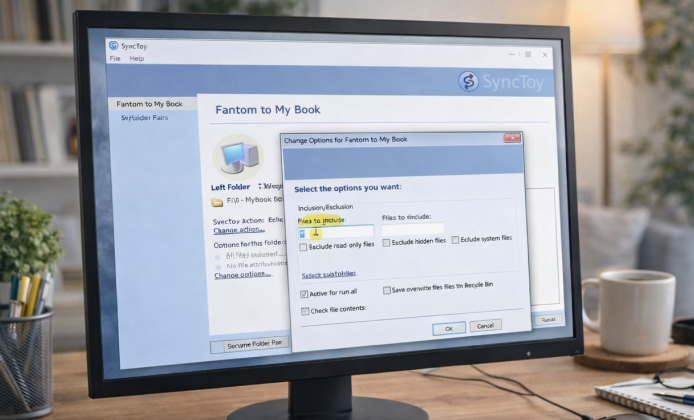
Keeping files identical across two folders sounds simple until you deal with duplicates, overwritten edits, or missing photos after a laptop refresh. SyncToy is a small Windows utility that focuses on one job: syncing folder pairs in predictable ways. Even though it’s an older tool, it’s still useful for straightforward backups, USB copy routines, and “mirror this folder to that folder” workflows—especially if you prefer a minimal interface.
What SyncToy Does (and Why People Still Use It)
SyncToy works by creating “folder pairs,” then applying an action that defines how changes flow between them. It’s great when you want repeatable results without learning a full backup suite. Common everyday uses include:
- Mirroring a “Work” folder to an external drive after each session.
- Synchronizing a photo folder from a camera SD backup to a main library.
- Copying a project directory between a desktop and a laptop using a portable drive.
- Keeping an archive folder consistent across partitions before reinstalling Windows.
If you want a safe option, the latest SyncToy free to download can still be found through reputable archival sources and verified mirrors today.
Picking the Right Sync Action
SyncToy typically offers a few clear sync behaviors. Choosing the correct one is the difference between a clean backup and an accidental delete. Here’s the usual intent behind each style:
| Action | Best for | Watch out for |
|---|---|---|
| Echo / Mirror | One-way backup to an external drive | Deletes can propagate if configured that way |
| Synchronize | Two-way updates across two folders | Conflicts if you edit the same file in both places |
| Contribute | Copy new/changed files without deleting from the destination | Destination may accumulate old files over time |
Many users search for SyncToy free to download because it remains lightweight and easy to learn for simple folder sync tasks.
Safer Download Habits
Because SyncToy is an older Microsoft utility, you’ll often encounter third-party pages offering installers. To reduce risk, treat any download like you would a driver package:
- Prefer well-known archival sites or official documentation references where possible.
- Check user comments and timestamps—fresh uploads on random domains are a red flag.
- Scan the installer with a reputable antivirus solution before running it.
- Verify file hashes if the source provides them, or compare with a known-good copy.
- Keep your backups separate from your sync destination until you trust the setup.
Before you click anything, you should compare checksums when you download SyncToy for free from any third-party site.
Using SyncToy on Windows 11
Windows 11 can run many older desktop apps, but you should still test with non-critical folders first. If you run into launch issues, try these common troubleshooting steps:
- Run as administrator for the first launch, then retry normally.
- Use Compatibility Mode if the interface behaves oddly or closes unexpectedly.
- Install required components (for example, older runtimes) only from trusted sources.
- Keep folder paths simple during initial setup (avoid overly deep nested directories).
On modern systems, SyncToy for Windows 11 free to download is often used in compatibility mode, provided you test a small sample set first.
A smart rule: never let a sync tool touch your only copy of important files until you’ve proven the folder pair behaves exactly as you expect.
Step-by-Step: Set Up a Reliable Folder Pair
This workflow is designed to be cautious and predictable, especially if you’re syncing to an external drive:
- Create a test folder pair with a handful of dummy files (not your real documents).
- Pick the action that matches your goal (one-way backup vs two-way sync).
- Preview changes before running, and read the list line-by-line.
- Run the sync once, then confirm results in both folders manually.
- Only then recreate the pair for your real folder locations.
For older laptops, people still rely on SyncToy download for free to keep USB backups consistent without extra tools.
Practical Tips That Prevent Common Mistakes
- Use a dedicated “Backup” folder: Don’t point SyncToy at your entire drive—keep it focused.
- Name pairs clearly: Example: “Docs_to_External_Mirror” instead of “Pair1.”
- Avoid syncing system folders: AppData and Windows directories can create noise and risk.
- Plan for conflicts: If two devices edit the same file, decide which location wins.
- Keep versions elsewhere: Sync tools aren’t the same as versioned backups.
A cautious workflow includes scanning installers after a free SyncToy download and storing the setup file offline for later reinstalls.
When SyncToy Isn’t the Best Fit
SyncToy shines for straightforward folder syncing, but it may not suit every scenario. Consider alternatives if you need:
- Real-time syncing with continuous monitoring.
- Version history and point-in-time restore.
- Cloud collaboration with sharing and permissions.
- Encryption, compression, or complex scheduling policies.
When setting up pairs, it helps to map drive letters so a SyncToy download for PC for free continues to work even after reboots.
Quick Checklist Before Your First Real Sync
- Do you have a separate backup copy that SyncToy won’t touch?
- Did you run a preview and understand every delete/copy action listed?
- Are you syncing only the folders you actually intend to manage?
- Is your external drive stable (no disconnects, no “sleep” drops) during sync?
If your goal is a simple, repeatable copy routine, SyncToy download for free can still be a handy solution when approached carefully. As long as you treat setup as a small “test first, then trust” process, SyncToy can help you keep folders tidy, reduce manual copying, and make backups less stressful.


 Install SyncToy Guide: Set Up Reliable Folder Sync on Windows
 SyncToy App: Practical Folder Syncing for Clean Backups and Simple Workflows
 SyncToy in 64-bit Environments: Practical File Synchronization for Modern PCs
 SyncToy for Free: A Practical Guide to Simple Folder Sync on Computer
 What Is SyncToy and How to Use?
 Best Apps Similar to SyncToy